Mean Median Mode Range Calculator
This calculator finds the mean, median, mode, and range of any list of numbers in one step. Just type your values, separated by commas or spaces, and you'll see all four results at once, along with the count, sum, smallest value, and largest value. There's nothing to memorize and no sorting to do by hand.
Ready for Analysis
Enter your dataset to see comprehensive statistical analysis

Created by Jose Smith
Last updated: September 20, 2026
What Do Mean, Median, Mode, and Range Actually Mean?
These four are the starter kit of statistics. Three of them (mean, median, and mode) are called measures of central tendency. That's a fancy way of saying they each point to the "typical" value in your data. The range is different. It measures spread, or how far apart your numbers sit.
Here's a quick look at each one before we work through the math.
Mean (the Average)
The mean is what most people call the average. You add up every number, then divide by how many numbers you have. It uses all your data, so a single very large or very small value can pull it up or down.
Median (the Middle)
The median is the middle value once your numbers are lined up in order. Half the values fall below it and half fall above. Because it only cares about position, one odd outlier barely moves it.
Mode (the Most Common)
The mode is the value that shows up most often. A data set can have one mode, several, or none at all. It's also the only one of these you can use on things that aren't numbers, like the most popular shirt size sold in a store.
Range (the Spread)
The range tells you the distance between your highest and lowest numbers. Subtract the smallest from the largest and you're done. A big range means your data is spread out. A small range means the values sit close together.
How to Calculate Mean, Median, Mode, and Range by Hand
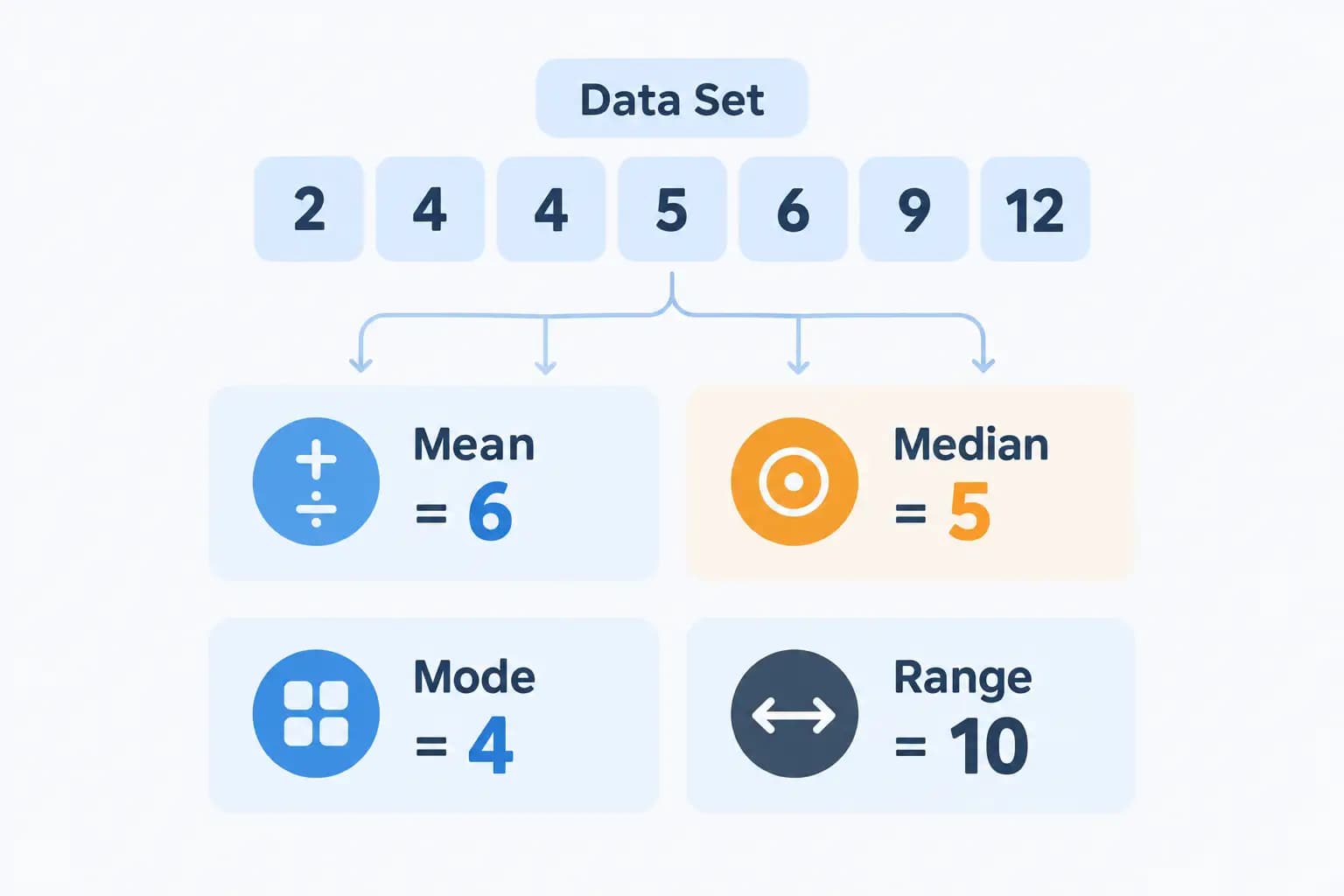
Let's run all four on the same simple data set so you can see how they connect:
2, 4, 4, 5, 6, 9, 12
Step 1: Find the Mean
Add every number, then divide by the count.
2 + 4 + 4 + 5 + 6 + 9 + 12 = 42
There are 7 numbers, so 42 ÷ 7 = 6. The mean is 6.
Step 2: Find the Median
First, put the numbers in order from smallest to largest. Ours already are:
2, 4, 4, 5, 6, 9, 12
There are 7 values, an odd count, so the median is just the middle one. That's the 4th number: 5.
Got an even count instead? Then you take the two middle numbers and average them. With 3, 8, 9, 15, for example, the middle pair is 8 and 9, so the median is (8 + 9) ÷ 2 = 8.5.
Step 3: Find the Mode
Count how many times each value appears. In our set, the number 4 shows up twice, and every other number shows up once. So the mode is 4.
If two values had tied for most frequent, you'd have two modes. If nothing repeated, there'd be no mode at all.
Step 4: Find the Range
Subtract the smallest value from the largest.
12 − 2 = 10
So for this data set, the mean is 6, the median is 5, the mode is 4, and the range is 10. Notice how the mean, median, and mode all landed on different numbers. That's normal. They only match up when your data is perfectly balanced.
Midrange, Standard Deviation, and Variance
This calculator shows a few more numbers beyond the core four, and they're worth understanding since they sit right alongside your results.
Midrange
The midrange is the point exactly halfway between your smallest and largest value. The formula is short:
Midrange = (Minimum + Maximum) / 2
For our example set (2, 4, 4, 5, 6, 9, 12), the midrange is (2 + 12) / 2 = 7. Unlike the mean, the midrange only looks at the two extreme values, so it moves a lot if either end of your data changes.
Standard Deviation and Variance
Standard deviation and variance both measure how far your values typically sit from the mean. This calculator computes the population versions of both, meaning it treats your entered numbers as the entire group you care about rather than a sample drawn from something larger.
Variance is the average of each value's squared distance from the mean. For our example set, the mean is 6. Squaring each difference from 6 and averaging the results gives a variance of 10. Standard deviation is just the square root of that number, so it comes out to about 3.16.
A small standard deviation means your values cluster tightly around the mean. A large one means they're spread out. It's a more precise spread measure than the range, since it uses every value instead of just the two extremes.
Quartiles, IQR, and Outliers in This Calculator
Below your basic stats, this calculator also lists Q1, Q3, the interquartile range (IQR), and any outliers it finds. Here's what those mean.
Q1 and Q3 mark the 25th and 75th percentile of your sorted data. This calculator finds them by locating a position roughly a quarter and three-quarters of the way through your sorted list, a simple position-based method rather than one of the interpolation methods used by a dedicated quartile calculator.
IQR is just Q3 minus Q1. It measures the spread of the middle half of your data, ignoring the extreme top and bottom quarters. For our example set, Q1 = 4 and Q3 = 9, so IQR = 5.
This calculator uses the IQR to flag outliers automatically. Any value below Q1 minus 1.5 times the IQR, or above Q3 plus 1.5 times the IQR, gets listed under "Outliers." For our example set, that fence runs from -3.5 to 16.5, so none of our seven values qualify. You can turn this check off with the Show Outliers switch if you'd rather see your raw data without any flags. Want to dig into fences and outlier detection on their own? The outlier calculator and the IQR calculator both walk through the same 1.5 × IQR rule in more depth.
Mean vs. Median vs. Mode: Which One Should You Use?
Good question, because picking the wrong one can paint a misleading picture.
Reach for the mean when your data is fairly even with no wild outliers. Test scores, daily temperatures, and heights all work well this way. If some values should count more than others, a plain average won't cut it, and a weighted average calculator handles that case.
Pick the median when a few extreme values could throw things off. Income is the classic example. A handful of very rich people can drag the average way up, while the median still shows what a typical person earns.
Use the mode when you care about what happens most often. Store owners lean on it to spot their best selling size or color. It's also your only option for categories and labels.
And the range? Treat it as a quick spread check. It won't tell the whole story, but it flags whether your numbers are tightly packed or all over the place. For a sharper measure of spread, the standard deviation calculator goes deeper.
Real-Life Examples
Numbers on a page can feel abstract, so here's where these show up in daily life.
- A teacher averages test scores to hand out grades. That's the mean.
- A real estate site reports the median home price in a city, so one giant mansion sale doesn't skew the number buyers see.
- A clothing brand tracks the mode of sizes sold to decide how many mediums versus larges to order next season.
- A weather report might mention the range of temperatures for the week, showing the gap between the coldest and warmest days.
Same four tools, very different jobs.
How Distribution Shape Affects These Measures
Mean, median, and mode don't always land close together, and when they don't, it tells you something about the shape of your data.
In a symmetric distribution, the mean, median, and mode all sit at roughly the same point. Test scores on an easy exam often look this way.
In a right-skewed distribution, a few unusually high values pull the mean above the median. Household income is the textbook example: most people earn a moderate amount, but a small number of very high earners drag the average upward while the median stays close to what a typical person actually makes.
In a left-skewed distribution, it's the opposite. A few unusually low values pull the mean below the median.
As a quick check, compare your mean and median. If they're close, your data is roughly symmetric. If they're far apart, look at which one is higher. A mean noticeably higher than the median usually points to right skew, and a mean noticeably lower points to left skew.
Common Mistakes to Watch For
Even simple stats trip people up. Here are the slips I see most.
- Forgetting to sort before finding the median. The median depends on order. Grab the physical middle of an unsorted list and you'll get the wrong answer almost every time.
- Assuming every data set has one mode. Some have two or more. Some have none. All three are perfectly valid.
- Mixing up range and mean. Range is about spread, not center. They answer different questions.
- Dividing by the wrong count. Count your values carefully, especially when some repeat. It's easy to miss one in a long list.
- Letting outliers fool you. If a number looks way out of place, check whether the mean still represents your data. Often the median tells a truer story.
How to Use This Calculator
You don't have to do any of that by hand, of course. Here's the fast way.
- Type or paste your numbers into the input box.
- Separate them with commas, spaces, or new lines. Pasting a column straight from a spreadsheet works fine too.
- Read your results. The tool shows the mean, median, mode, and range instantly, plus the count, sum, minimum, maximum, midrange, Q1, Q3, IQR, standard deviation, variance, and any outliers.
That's it. No sign up, and it handles decimals and negative numbers without any fuss. If you only ever need the average on its own, the average calculator keeps things even simpler.
Frequently Asked Questions
Is the mean the same as the average?
Yes. In everyday math, "mean" and "average" mean the same thing. You add the numbers and divide by how many there are.
Can a data set have more than one mode?
It can. If two or more values tie for the most appearances, each one counts as a mode. Two modes make the set bimodal, and more than two make it multimodal.
What if no number repeats?
Then the data set has no mode. That's a valid result, not an error. It simply means every value appears the same number of times.
Do I need to sort my numbers first?
Not for this calculator. It sorts them for you. If you're working by hand, though, you must put them in order before finding the median.
Can I use negative numbers or decimals?
Yes. The calculator handles negatives, decimals, and whole numbers together with no problem.
Which measure is affected most by outliers?
The mean. One very high or very low value can pull it far from the typical number. The median stays much steadier, which is why it's often better for skewed data.
What's the difference between range and midrange?
Range is the distance between the highest and lowest values. Midrange is the point halfway between them, found by adding those two values and dividing by 2.
How many numbers can I enter?
Up to 10,000 values. A few numbers or a long list pasted from a spreadsheet both work, right up to that limit.